

-3.16.0.dev77-gold?style=flat)
Patterns for working with temporal coordinates. |
Tags: topic_data_model | topic_plotting
Temporal Coordinates#
This page provides practical patterns and tips for working with temporal
coordinates, that is, time coordinates.
Introduction#
First, let’s familiarise ourselves with the time coordinate that we’ll be
working with:
>>> tcoord = cube.coord("time")
>>> tcoord
<DimCoord: time / (hours since 1970-01-01 00:00:00)  [...]  shape(6,)>
Let’s break down this coordinate summary so that we understand each of its individual components:
DimCoord- This is the coordinate type, which may be either aDimCoordorAuxCoord. A dimensional coordinate (DimCoord) must be numeric, strictly monotonic, have no missing data, and at most 1D. Otherwise, it’s an auxiliary coordinate (AuxCoord), which is not restricted by data type nor dimensionality.time- This is the name of the coordinate. The name is derived firstly from the coordinatestandard_name. Failing that, thelong_nameis used, otherwise thevar_namebefore defaulting to a value ofunknown.hours since 1970-01-01 00:00:00- This tells us the coordinate’s temporal units of measure (hours) relative to its epoch (1970-01-01 00:00:00).[...]- Represents the temporalpoints, the values of which are not displayed in this shortened summary. However, if the coordinate hadboundsthis would be represented as[...]+bounds.shape(6,)- Tells us that the coordinate has one dimension containing6points.
We can easily inspect the points contained within our tcoord:
>>> tcoord.points
array([347926.16666667, 347926.33333333, 347926.5       , 347926.66666667,
   347926.83333333, 347927.        ])
However, these raw values are difficult to interpret on their own. As noted above,
these points are measured in units of hours relative to the epoch
1970-01-01 00:00:00. The metadata defining all this information is available
from the units attribute of the coordinate:
>>> tcoord.units
Unit('hours since 1970-01-01 00:00:00', calendar='standard')
Note
All temporal coordinates have a calendar attribute associated with
their units.
In this case our tcoord has a standard (or gregorian) calendar and
we can convert its hard-to-interpret raw values into meaningful date/time
(YYYY-MM-DD HH:MM:SS) representations relative to its calendar and
epoch:
>>> print(tcoord)
DimCoord :  time / (hours since 1970-01-01 00:00:00, standard calendar)
points: [
    2009-09-09 22:10:00, 2009-09-09 22:20:00, 2009-09-09 22:30:00,
    2009-09-09 22:40:00, 2009-09-09 22:50:00, 2009-09-09 23:00:00]
shape: (6,)
dtype: float64
standard_name: 'time'
Now we can clearly see that the tcoord interval starts on 2009-09-09 at
22:10:00 with samples spaced 10 minutes apart.
Note that our tcoord does not have any bounds associated with it:
>>> tcoord.has_bounds()
False
>>> tcoord.bounds is None
True
However, as a convenience, we can guess the bounds of a coordinate using
its guess_bounds() method:
>>> tcoord.guess_bounds()
>>> print(tcoord)
DimCoord :  time / (hours since 1970-01-01 00:00:00, standard calendar)
points: [
    2009-09-09 22:10:00, 2009-09-09 22:20:00, 2009-09-09 22:30:00,
    2009-09-09 22:40:00, 2009-09-09 22:50:00, 2009-09-09 23:00:00]
bounds: [
    [2009-09-09 22:05:00, 2009-09-09 22:15:00],
    [2009-09-09 22:15:00, 2009-09-09 22:25:00],
    [2009-09-09 22:25:00, 2009-09-09 22:35:00],
    [2009-09-09 22:35:00, 2009-09-09 22:45:00],
    [2009-09-09 22:45:00, 2009-09-09 22:55:00],
    [2009-09-09 22:55:00, 2009-09-09 23:05:00]]
shape: (6,)  bounds(6, 2)
dtype: float64
standard_name: 'time'
Warning
guess_bounds() is an in-place operation.
Indexing#
Coordinates are first-class citizens and may be
indexed akin to other python built-in types such as lists or tuples.
As an example, let’s index the last sample of the tcoord:
>>> tsample = tcoord[-1]
>>> print(tsample)
DimCoord :  time / (hours since 1970-01-01 00:00:00, standard calendar)
points: [2009-09-09 23:00:00]
bounds: [[2009-09-09 22:55:00, 2009-09-09 23:05:00]]
shape: (1,)  bounds(1, 2)
dtype: float64
standard_name: 'time'
Note
Indexing a coordinate returns a new instance of the same coordinate type
i.e., AuxCoord or DimCoord,
populated with all the metadata and associated data i.e.,
points, or points and bounds, at the given index/indices.
In the above example, indexing the tcoord yields a scalar
DimCoord which we can sanity check for equivalence:
>>> tsample == tcoord[-1]
True
A lighter-weight indexing solution is to leverage the cell()
method instead:
>>> tcell = tcoord.cell(-1)
>>> tcell
Cell(point=cftime.DatetimeGregorian(2009, 9, 9, 23, 0, 0, 0, has_year_zero=False), bound=(cftime.DatetimeGregorian(2009, 9, 9, 22, 55, 0, 0, has_year_zero=False), cftime.DatetimeGregorian(2009, 9, 9, 23, 5, 0, 0, has_year_zero=False)))
This returns a Cell object rather than a
coordinate, which only contains the point, or
point and bound at the given index:
>>> tcell.point
cftime.DatetimeGregorian(2009, 9, 9, 23, 0, 0, 0, has_year_zero=False)
>>> tcell.bound
(cftime.DatetimeGregorian(2009, 9, 9, 22, 55, 0, 0, has_year_zero=False), cftime.DatetimeGregorian(2009, 9, 9, 23, 5, 0, 0, has_year_zero=False))
Warning
A temporal Cell will always contain
cftime objects rather than native python
datetime objects.
The tsample (DimCoord) and tcell
(Cell) were both generated from the same index of tcoord.
However, the tsample does not contain rich date/time objects, rather it
contains numerical offsets measured relative to the calendar and epoch
defined within its units:
>>> tsample.units
Unit('hours since 1970-01-01 00:00:00', calendar='standard')
>>> tsample.points
array([347927.])
>>> tsample.bounds
array([[347926.91666667, 347927.08333333]])
To convert these points and bounds into equivalent tcell
cftime objects, apply the following pattern:
>>> tsample.units.num2date(tsample.points)
array([cftime.DatetimeGregorian(2009, 9, 9, 23, 0, 0, 0, has_year_zero=False)],
  dtype=object)
>>> tsample.units.num2date(tsample.bounds)
array([[cftime.DatetimeGregorian(2009, 9, 9, 22, 55, 0, 0, has_year_zero=False),
    cftime.DatetimeGregorian(2009, 9, 9, 23, 5, 0, 0, has_year_zero=False)]],
  dtype=object)
Iteration#
As with indexing, we can also
iterate over coordinates just as you would naturally
with other python built-in types such as lists or tuples.
For example, given our tcoord:
>>> print(tcoord)
DimCoord :  time / (hours since 1970-01-01 00:00:00, standard calendar)
points: [
    2009-09-09 22:10:00, 2009-09-09 22:20:00, 2009-09-09 22:30:00,
    2009-09-09 22:40:00, 2009-09-09 22:50:00, 2009-09-09 23:00:00]
bounds: [
    [2009-09-09 22:05:00, 2009-09-09 22:15:00],
    [2009-09-09 22:15:00, 2009-09-09 22:25:00],
    [2009-09-09 22:25:00, 2009-09-09 22:35:00],
    [2009-09-09 22:35:00, 2009-09-09 22:45:00],
    [2009-09-09 22:45:00, 2009-09-09 22:55:00],
    [2009-09-09 22:55:00, 2009-09-09 23:05:00]]
shape: (6,)  bounds(6, 2)
dtype: float64
standard_name: 'time'
We can easily iterate over each index:
>>> from pprint import pprint
>>> pprint(list(tcoord))
[<DimCoord: time / (hours since 1970-01-01 00:00:00)  [2009-09-09 22:10:00]+bounds>,
 <DimCoord: time / (hours since 1970-01-01 00:00:00)  [2009-09-09 22:20:00]+bounds>,
 <DimCoord: time / (hours since 1970-01-01 00:00:00)  [2009-09-09 22:30:00]+bounds>,
 <DimCoord: time / (hours since 1970-01-01 00:00:00)  [2009-09-09 22:40:00]+bounds>,
 <DimCoord: time / (hours since 1970-01-01 00:00:00)  [2009-09-09 22:50:00]+bounds>,
 <DimCoord: time / (hours since 1970-01-01 00:00:00)  [2009-09-09 23:00:00]+bounds>]
Note that this is functionally equivalent to the following:
pprint([sample for sample in tcoord])
Both of the above patterns generate a list of scalar DimCoord
objects at each coordinate index in tcoord.
Note
Iterating over a coordinate returns a new instance of the same coordinate
type i.e., AuxCoord or DimCoord,
populated with all the metadata and associated data i.e.,
points, or points and bounds, for each coordinate index.
Alternatively, we can use the cells() method to generate
lighter-weight Cell objects for each coordinate index
rather than DimCoord objects.
For example, let’s generate a list containing only the point (ignoring the
bound) of each Cell in the tcoord:
>>> pprint([cell.point for cell in tcoord.cells()])
[cftime.DatetimeGregorian(2009, 9, 9, 22, 10, 0, 0, has_year_zero=False),
cftime.DatetimeGregorian(2009, 9, 9, 22, 30, 0, 0, has_year_zero=False),
cftime.DatetimeGregorian(2009, 9, 9, 22, 40, 0, 0, has_year_zero=False),
cftime.DatetimeGregorian(2009, 9, 9, 22, 20, 0, 0, has_year_zero=False),
cftime.DatetimeGregorian(2009, 9, 9, 22, 50, 0, 0, has_year_zero=False),
cftime.DatetimeGregorian(2009, 9, 9, 23, 0, 0, 0, has_year_zero=False)]
Warning
By default a temporal Cell will always contain
cftime objects rather than native python
datetime objects.
Note that, again we can achieve the equivalent result using
num2date():
>>> tcoord.units.num2date(tcoord.points)
array([cftime.DatetimeGregorian(2009, 9, 9, 22, 10, 0, 0, has_year_zero=False),
   cftime.DatetimeGregorian(2009, 9, 9, 22, 20, 0, 0, has_year_zero=False),
   cftime.DatetimeGregorian(2009, 9, 9, 22, 30, 0, 0, has_year_zero=False),
   cftime.DatetimeGregorian(2009, 9, 9, 22, 40, 0, 0, has_year_zero=False),
   cftime.DatetimeGregorian(2009, 9, 9, 22, 50, 0, 0, has_year_zero=False),
   cftime.DatetimeGregorian(2009, 9, 9, 23, 0, 0, 0, has_year_zero=False)],
  dtype=object)
cftime vs datetime#
Depending on your workflow, you may wish to deal directly with either
cftime objects or native python
datetime objects rather than raw temporal values within
the points/bounds of a coordinate.
There are several ways to convert raw temporal values, so let’s consolidate our understanding and enumerate the options available to us.
cftime#
The direct approach is to use either cell()
or cells(). Both provide one or more
Cell objects.
By default a temporal Cell will always contain
cftime objects for its point, or point and bound.
Alternatively, manual conversion to cftime objects for
the points or bounds of a coordinate can be easily achieved with the
following pattern:
>>> tcoord.units.num2date(tcoord.points)
array([cftime.DatetimeGregorian(2009, 9, 9, 22, 10, 0, 0, has_year_zero=False),
   cftime.DatetimeGregorian(2009, 9, 9, 22, 20, 0, 0, has_year_zero=False),
   cftime.DatetimeGregorian(2009, 9, 9, 22, 30, 0, 0, has_year_zero=False),
   cftime.DatetimeGregorian(2009, 9, 9, 22, 40, 0, 0, has_year_zero=False),
   cftime.DatetimeGregorian(2009, 9, 9, 22, 50, 0, 0, has_year_zero=False),
   cftime.DatetimeGregorian(2009, 9, 9, 23, 0, 0, 0, has_year_zero=False)],
  dtype=object)
>>> tcoord.units.num2date(tcoord.bounds)
array([[cftime.DatetimeGregorian(2009, 9, 9, 22, 5, 0, 0, has_year_zero=False),
    cftime.DatetimeGregorian(2009, 9, 9, 22, 15, 0, 0, has_year_zero=False)],
   [cftime.DatetimeGregorian(2009, 9, 9, 22, 15, 0, 0, has_year_zero=False),
    cftime.DatetimeGregorian(2009, 9, 9, 22, 25, 0, 0, has_year_zero=False)],
   [cftime.DatetimeGregorian(2009, 9, 9, 22, 25, 0, 0, has_year_zero=False),
    cftime.DatetimeGregorian(2009, 9, 9, 22, 35, 0, 0, has_year_zero=False)],
   [cftime.DatetimeGregorian(2009, 9, 9, 22, 35, 0, 0, has_year_zero=False),
    cftime.DatetimeGregorian(2009, 9, 9, 22, 45, 0, 0, has_year_zero=False)],
   [cftime.DatetimeGregorian(2009, 9, 9, 22, 45, 0, 0, has_year_zero=False),
    cftime.DatetimeGregorian(2009, 9, 9, 22, 55, 0, 0, has_year_zero=False)],
   [cftime.DatetimeGregorian(2009, 9, 9, 22, 55, 0, 0, has_year_zero=False),
    cftime.DatetimeGregorian(2009, 9, 9, 23, 5, 0, 0, has_year_zero=False)]],
  dtype=object)
datetime#
Converting raw temporal values to native python datetime
objects is only valid for standard, gregorian or proleptic_gregorian
calendar encoded data.
See also
cftime.num2date() for further details.
Given that our example tcoord has standard (equivalent to gregorian)
calendar encoded samples:
>>> tcoord.units
Unit('hours since 1970-01-01 00:00:00', calendar='standard')
We are safe to convert either of its points or bounds to
datetime equivalent objects using
num2pydate():
>>> tcoord.units.num2pydate(tcoord.points)
array([real_datetime(2009, 9, 9, 22, 10),
   real_datetime(2009, 9, 9, 22, 20),
   real_datetime(2009, 9, 9, 22, 30),
   real_datetime(2009, 9, 9, 22, 40),
   real_datetime(2009, 9, 9, 22, 50),
   real_datetime(2009, 9, 9, 23, 0)], dtype=object)
>>> tcoord.units.num2pydate(tcoord.bounds)
array([[real_datetime(2009, 9, 9, 22, 5),
    real_datetime(2009, 9, 9, 22, 15)],
   [real_datetime(2009, 9, 9, 22, 15),
    real_datetime(2009, 9, 9, 22, 25)],
   [real_datetime(2009, 9, 9, 22, 25),
    real_datetime(2009, 9, 9, 22, 35)],
   [real_datetime(2009, 9, 9, 22, 35),
    real_datetime(2009, 9, 9, 22, 45)],
   [real_datetime(2009, 9, 9, 22, 45),
    real_datetime(2009, 9, 9, 22, 55)],
   [real_datetime(2009, 9, 9, 22, 55),
    real_datetime(2009, 9, 9, 23, 5)]], dtype=object)
Hint
Note that num2pydate(value) is functionally equivalent to
num2date(value, only_use_cftime_datetimes=False, only_use_python_datetimes=True).
Alternatively, we can explicitly instruct the cell() or
cells() methods to return datetime
compatible objects:
>>> [cell.point for cell in tcoord.cells(pydate=True)]
[real_datetime(2009, 9, 9, 22, 10),
 real_datetime(2009, 9, 9, 22, 20),
 real_datetime(2009, 9, 9, 22, 30),
 real_datetime(2009, 9, 9, 22, 40),
 real_datetime(2009, 9, 9, 22, 50),
 real_datetime(2009, 9, 9, 23, 0)]
>>> [cell.bound for cell in tcoord.cells(pydate=True)]
[(real_datetime(2009, 9, 9, 22, 5), real_datetime(2009, 9, 9, 22, 15)),
 (real_datetime(2009, 9, 9, 22, 15), real_datetime(2009, 9, 9, 22, 25)),
 (real_datetime(2009, 9, 9, 22, 25), real_datetime(2009, 9, 9, 22, 35)),
 (real_datetime(2009, 9, 9, 22, 35), real_datetime(2009, 9, 9, 22, 45)),
 (real_datetime(2009, 9, 9, 22, 45), real_datetime(2009, 9, 9, 22, 55)),
 (real_datetime(2009, 9, 9, 22, 55), real_datetime(2009, 9, 9, 23, 5))]
Plotting#
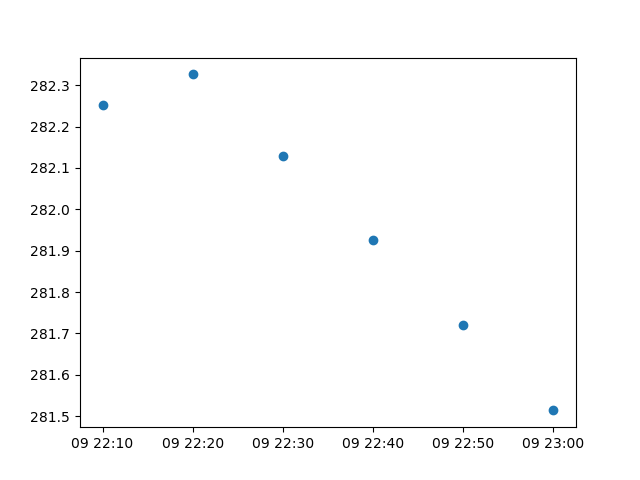
Creating a time-series plot is trivial when using iris.plot or
iris.quickplot as they both handle cftime objects
and native python datetime objects automatically.
For example:
 1import matplotlib.pyplot as plt
 2
 3import iris
 4import iris.plot as iplt
 5
 6fname = iris.sample_data_path("colpex.pp")
 7cube = iris.load_cube(fname, "air_potential_temperature")
 8tcoord = cube.coord("time")
 9
10iplt.scatter(tcoord, cube[:, 0, 0, 0])
11plt.show()
Warning
Native matplotlib only supports python datetime
compatible objects.
Note that iris.plot and iris.quickplot provide the convenience
of also understanding iris objects, such as coordinates and cubes. However
they also use the nc-time-axis package, which provides support for a cftime
axis in matplotlib.
For comparison purposes, we can generate the same time-series scatter plot,
but use nc-time-axis directly as follows:
 1import matplotlib.pyplot as plt
 2
 3import iris
 4import nc_time_axis
 5
 6fname = iris.sample_data_path("colpex.pp")
 7cube = iris.load_cube(fname, "air_potential_temperature")
 8tcoord = cube.coord("time")
 9
10dates = tcoord.units.num2date(tcoord.points)
11data = cube[:, 0, 0, 0].data
12
13plt.scatter(dates, data)
14plt.show()
Alternatively, we can manually convert our time-series values directly to
datetime objects:
 1import matplotlib.pyplot as plt
 2
 3import iris
 4
 5fname = iris.sample_data_path("colpex.pp")
 6cube = iris.load_cube(fname, "air_potential_temperature")
 7tcoord = cube.coord("time")
 8
 9dates = [cell.point for cell in tcoord.cells(pydate=True)]
10data = cube[:, 0, 0, 0].data
11
12plt.scatter(dates, data)
13plt.show()